


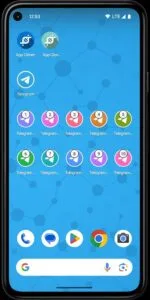
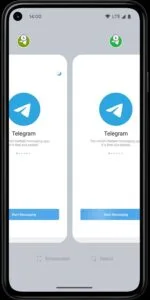
App Cloner is a powerful Android application designed to create exact copies of any app installed on your smartphone or tablet. This innovative tool enables users to run multiple instances of the same application simultaneously, opening up a world of possibilities for managing various accounts or separating personal and professional use. It’s important to note that while the copies are highly faithful, the cloning process alters the app’s certificate, which can affect the functionality of certain applications, such as YouTube, preventing them from running correctly due to licensing and certificate requirements.
Duplicate Apps Effortlessly
This platform simplifies the creation of multiple instances for virtually any application on your device. Imagine needing separate accounts for a messaging app or a game; this utility makes it straightforward to achieve without constantly logging in and out. Users can maintain distinct profiles for work and personal life within the same social media application, enhancing organization and efficiency directly from their Android device.
Tailored App Customization
Beyond mere duplication, the tool offers extensive options to personalize each cloned instance. Users can modify the app icon, change its display name, or even tweak various permissions and settings for the cloned version. This level of customization allows for a unique user experience, making it easy to distinguish between the original and its copies at a glance, and tailoring their behavior to specific needs.
Enhanced Privacy Controls
The application provides several features aimed at bolstering user privacy within cloned apps. For instance, you can enable an incognito mode for specific copies, preventing them from accessing certain device identifiers or modifying their data storage. This capability is particularly useful for testing new features or accessing services without leaving a trace on your main profile, offering a more secure and isolated environment for sensitive activities.
Seamless Instance Management
Managing numerous versions of applications is made intuitive through this comprehensive experience. It allows users to view and organize all their cloned apps in one place, simplifying the process of launching the correct instance for any given task. Whether you’re juggling multiple social media profiles or testing different configurations of an app, the platform ensures a smooth and efficient workflow, minimizing clutter and maximizing productivity.












Write a review